

TV in the production office
The TV in the production office shows the event’s live status at a glance, built for 1920 × 1080 and readable from 3 m. It needs no personal login, only a display token.
Issuing a display token
Section titled “Issuing a display token”On the QR access page the agency finds the section “Display token (TV)”. Give the screen a name (e.g. “TV production office”) and tap “Issue display token”. Open the link in the TV’s browser, ideally full screen. The link stays visible while the token is valid.
A display token works for this event only, read-only, and shows no contact or bank details. Names of people appear only under “On duty”, without phone or e-mail. “Revoke” ends the display on its next refresh; archiving the event ends it too. Issuing and revoking are recorded in the log.
What the TV shows
Section titled “What the TV shows”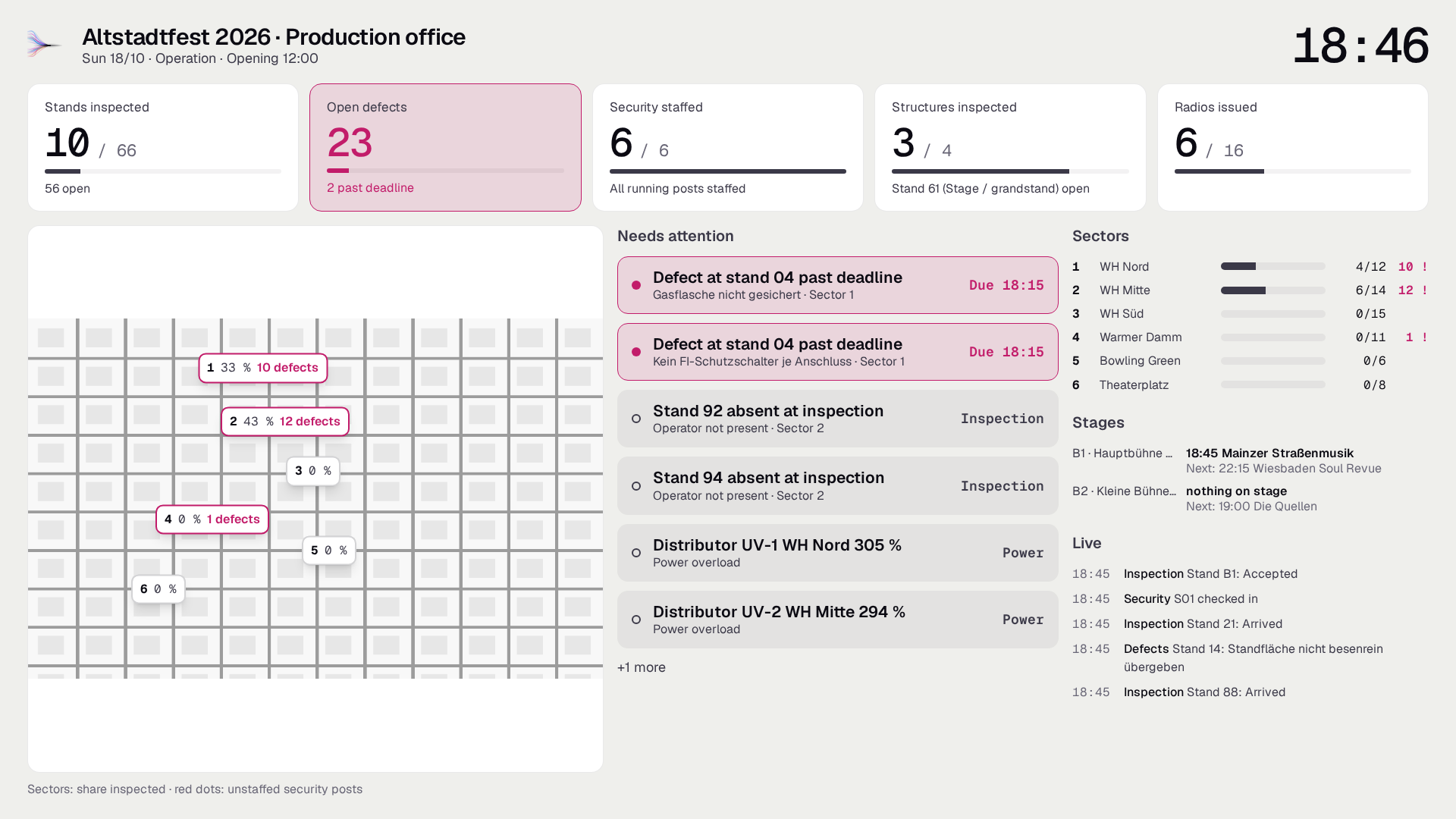
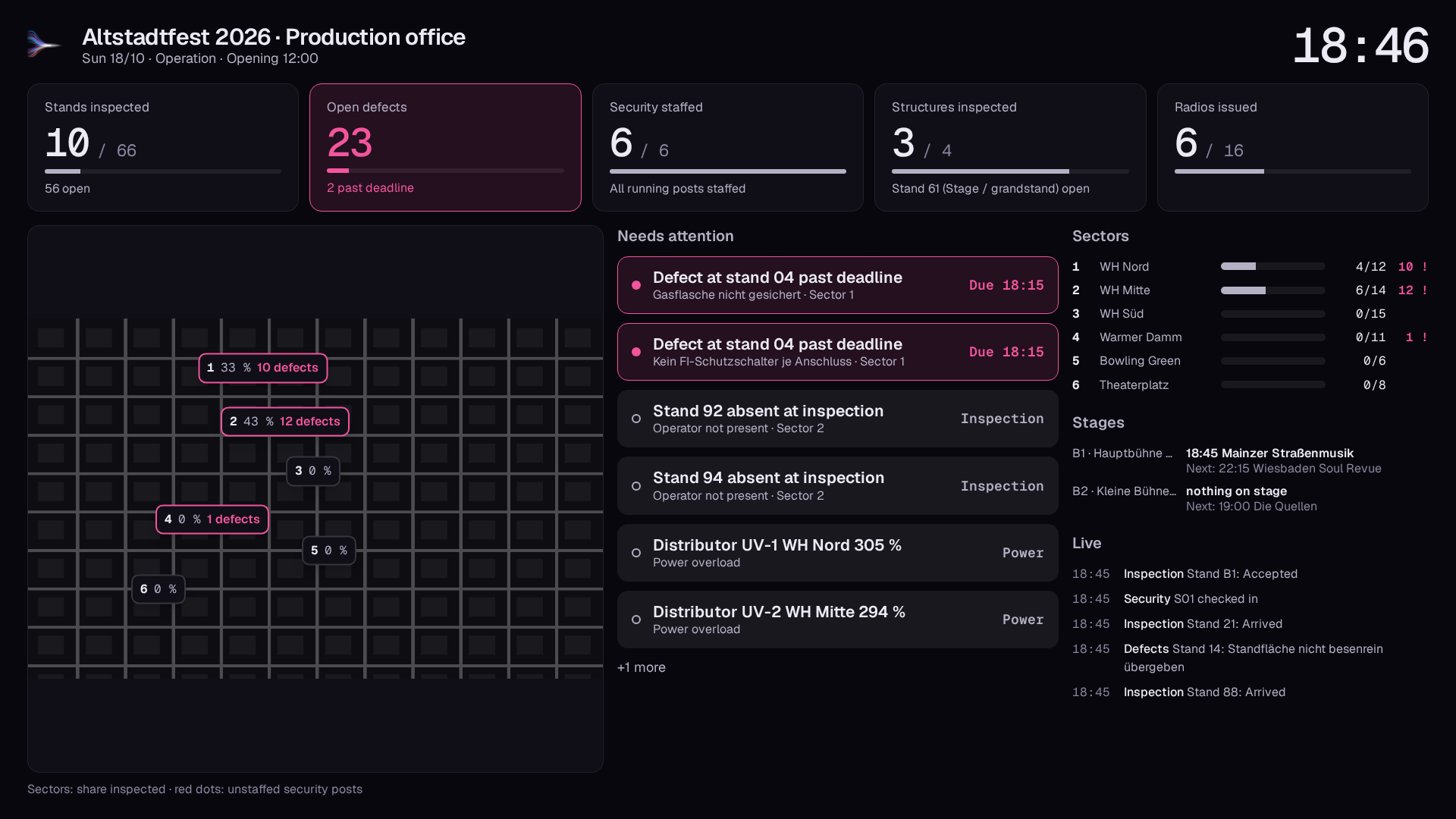
- Clock and phase: day, setup, operation or teardown, the next opening and, from two hours before, “Opening in … min” (from one hour before in the signal colour).
- Weather: next to the clock the highest active warning level (DWD or manual) as bars with kind and validity (“until 18:00” or “until further notice”), further active warnings and open measures. Open measures are weather proposals nobody has confirmed or dismissed yet. If data is missing, out of date or no longer fetched outside the polling window (10 days before to 1 day after the event), the pill says so (“Weather data out of date · as of …”), never “No weather warning”.
- Key figures: stands inspected (in teardown: dismantled), open defects (of which past deadline, i.e. escalated; a background job sets this up to 5 minutes after the deadline, up to an hour outside 10 days before until one day after the event), security staffed (missing posts, of which longer than 10 min), temporary structures inspected, radios issued.
- Radios: issued / total with the earliest return deadline. Total counts all radios of the event in material issue that are not retired and whose category reads “Funkgerät”, “Funkgeräte”, “Funk”, “Radio” or “Radios” (case does not matter, “ae” for “ä” works too). Issued are those out in an open handout. Without a radio the card says “No radios in this event”.
- Site plan: per sector the share of inspected stands and the number of open defects, red dots for unstaffed and understaffed security posts. Without a plan image a neutral grid.
- Needs attention: red (filled dot) unstaffed and understaffed posts, temporary structures not inspected before opening, stands not inspected before opening (per sector with count), defects past deadline (escalated; never findings of the inspection after teardown); yellow (ring) power overload, stands absent at inspection and build queries: temporary structures without a test book date, with a test book expiring before the event ends, or with a notice the building authority has not confirmed yet. Inspections before opening appear on the day of the opening. Whatever does not fit is listed as “+N more”.
- Sectors: bars with inspected/expected and open defects.
- Stages (operation only): per stage the current and the next act, an applied shift as “shifted … min”. An applied shift reaches the TV within 15 seconds.
- On duty: per work area of the duty plan who is working right now (names only), otherwise “nobody”; up to four areas, the rest as “+N more”.
- Live: the latest changes (inspections, defects, check-ins, shifts) with the area instead of names; an inspection after teardown as “Teardown OK” or “Teardown with defects”.
Cancelled stands do not count in open defects, defects per sector, overdue defects and “not present”.
Contents per phase
Section titled “Contents per phase”The phase follows the operating day (06:00 to 06:00, so the last night after midnight still counts as operation): setup before the event days, operation on the event days, teardown afterwards. Append ?phase=setup, ?phase=operation or ?phase=teardown to the link to fix a phase.
| Content | Setup | Operation | Teardown |
|---|---|---|---|
| Stands key figure | inspected | inspected | dismantled |
| Stages | – | ✓ | – |
| Inspections before opening, absent, build queries | ✓ | ✓ | – |
| Unstaffed posts, defects past deadline, power overload | ✓ | ✓ | ✓ |
| Weather, on duty, site plan, sectors, live | ✓ | ✓ | ✓ |
Refresh and connection
Section titled “Refresh and connection”The TV fetches the new status every 15 seconds. If the connection drops, the last status stays on screen with the notice “Connection lost · as of …” and the time of the last refresh. A revoked token shows only the notice, no data.